Resize images
Change pixel width and height using a percentage, dimensions, or a preset.
Reference edition 2.0.0. Version 2.0.0 is a pre-release for Windows and Linux, available by manual download. Some screenshots come from an earlier development edition and may show different controls; their values are examples. Review your package’s release notes and saving options before processing.
On this page
Find the tool
Open Resize → Resize. Crop and Canvas share the selection but perform different operations.
The limit is 100 images. The general selector offers more extensions than this save path reliably supports. Prefer JPEG, PNG, WebP, BMP, TIFF, or HEIC/HEIF with its codec. Convert AVIF or ICO copies to PNG/JPEG first; see the matrix. Animation and multiple pages are not preserved.
Modes
| Mode | Controls | Result |
|---|---|---|
| Percentage | 1–200 %, initially 50 % | Multiplies width and height by the percentage. |
| Pixels | Width, Height, Maintain aspect ratio | Calculates or constrains dimensions from your input. |
| Preset | Predefined sizes | Forces the preset’s exact width and height. |
Gray examples such as 1920 or 1080 in empty fields are placeholders, not entered values.
Percentage
50 % turns 4000 × 3000 into approximately 2000 × 1500. 100 % keeps dimensions. 200 % doubles both sides and quadruples the pixel count. Enlarging cannot recover missing detail. Results round to whole pixels.
Pixels and aspect ratio
Aspect ratio is width relative to height. Maintain aspect ratio starts enabled.
- Width only: calculates proportional height, even if that enlarges the image.
- Height only: calculates proportional width.
- Both, with the checkbox enabled: fits inside that rectangle without distortion. This fitting mode does not enlarge an image already smaller than the box.
- Both, with the checkbox disabled: forces the dimensions and distorts images with a different ratio.
Use positive integers. Empty or invalid dimensions cannot produce the expected result; depending on the case, a warning or errors in the summary appear.
Presets
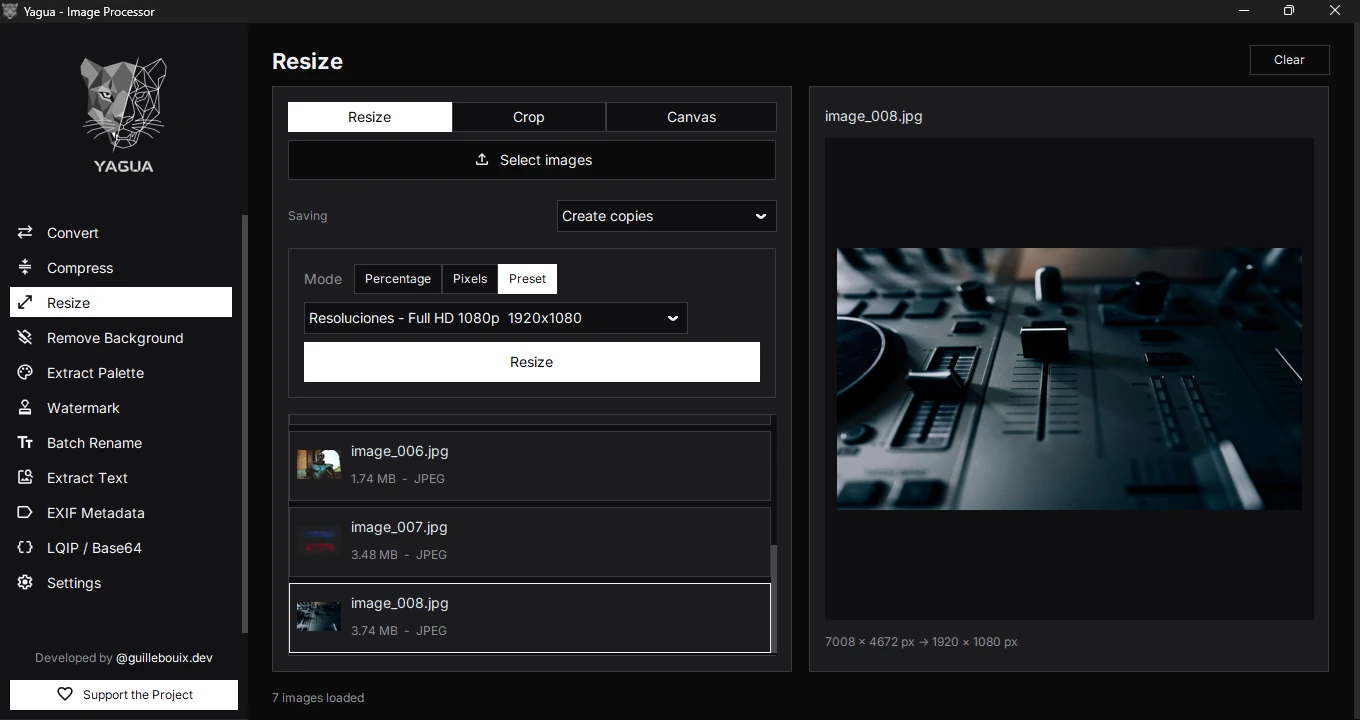
Groups include Instagram, Facebook, Twitter / X, YouTube, LinkedIn, TikTok / Whatsapp, Pinterest, Web, resolutions, and icons. The initial preset is Instagram - Post cuadrado 1:1, 1080 × 1080. Screen sizes include Full HD 1080p (1920 × 1080), shown in the screenshot. See the complete table in Formats and limits.
A preset does not crop or add margins: it resizes to an exact box and can distort a photograph. For 1280 × 720 without distortion, crop to 16:9 first, then resize. To preserve the full image, use Canvas.
Procedure and example
- Load photos with Select images.
- Choose Pixels, enter Width 1600, and leave Height empty.
- Under Saving, choose Create copies. Click Resize, choose output, and review the confirmation.
- Wait for the summary and check saved dimensions.
A 4000 × 3000 photograph becomes 1600 × 1200. Create copies saves foto.jpg, adding a counter for an occupied destination and preserving the original. Overwrite originals allows replacement. Check the mode before confirming. The input format remains; re-encoding does not guarantee preservation of all EXIF or a particular size.
The screenshot shows an image preview with the Full HD 1080p (1920 × 1080) preset selected. A preset uses its exact dimensions; it does not crop or add margins.
Selection and clearing
The right panel preview changes with the active tab, selected image, and current controls. In Resize, it shows the resulting composition alongside the source and output dimensions. It uses reduced pixels and is not for checking final detail at 1:1. Changing parameters updates the preview only: it does not save files or modify inputs. To process, click Resize and confirm the destination. New files replace the batch; switching tabs uses the same inputs rather than a previous output. Clear empties the selection but retains sizing options. Pixel fields may become empty when the mode is rebuilt, so review them when switching modes.